
Integrating AI (Claude) with Zoho CRM

This article introduces ways to use AI to retrieve, analyze and update data in Zoho CRM, helping users reduce repetitive actions, improve productivity and make decisions faster.
Zoho MCP
AI platforms can interact with Zoho CRM through MCP (Model Context Protocol). This protocol lets AI connect to other systems while maintaining tight control over its permissions to access and edit data. The ways to connect Zoho MCP, their setup and their limits are covered in What Is Zoho MCP and How to Use It Right.
The examples below use Claude. You can do the same with other AI platforms that support MCP.
Use cases for connecting Claude to Zoho MCP
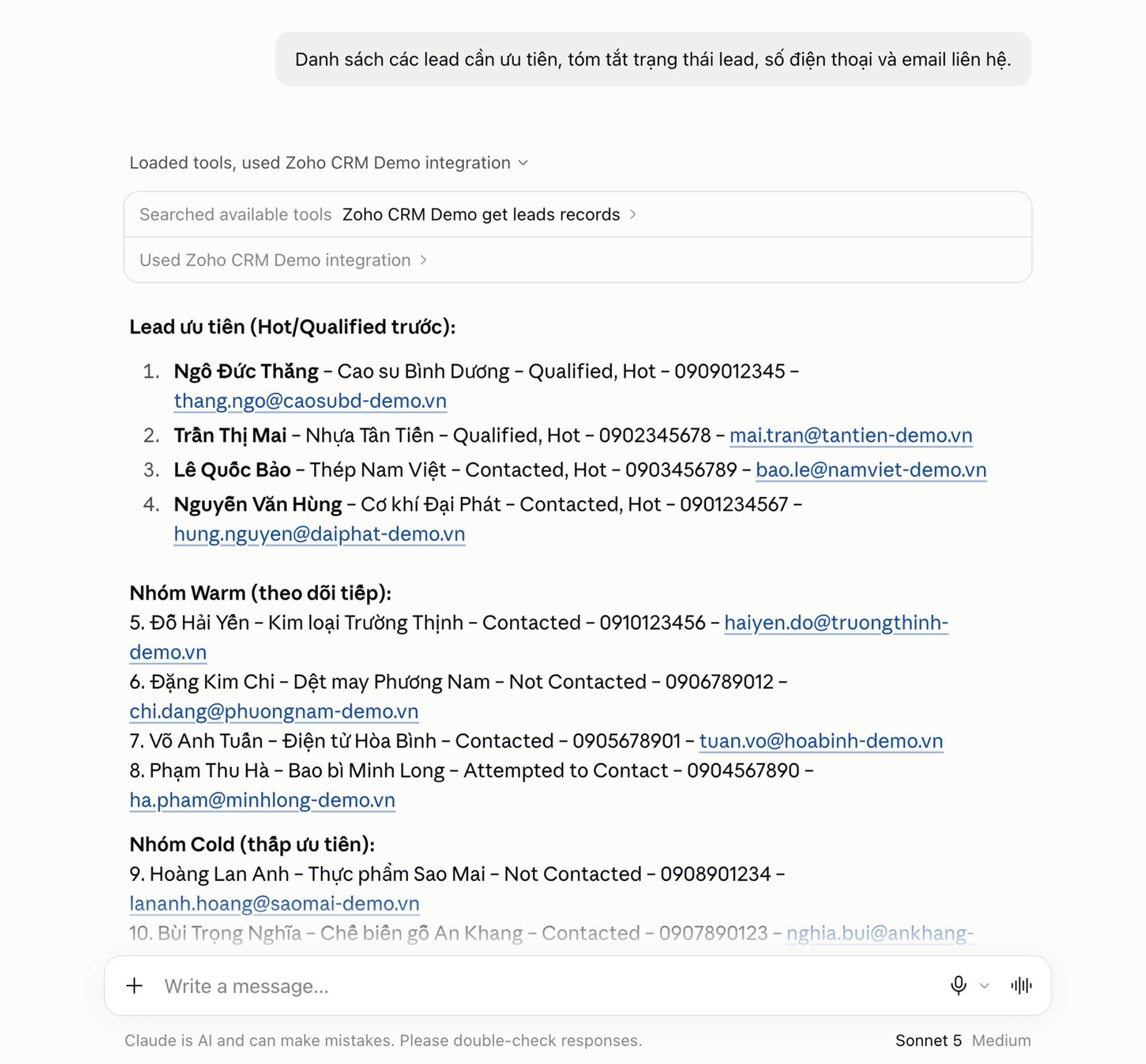
Analyze and compile a list of leads to prioritize for contact.
Create new leads from quick notes


Update lead information in bulk


Create reports on demand

Benefits of integrating AI with Zoho CRM
Make it easier to query and update data
Most missing CRM data is not missing because employees do not know how to enter it, but because every entry takes several actions. When recording information takes just one message, things previously skipped get recorded: a note after a call, a status change, a lead who just messaged on Zalo. CRM is only useful when its data is complete and current, and this is an effective way to keep it that way.
Reduce the time needed to learn Zoho CRM
Users do not need to know where a feature sits in the interface to get what they need. This is especially clear for managers who do not use CRM daily and only occasionally need to view reports.
Even so, a basic understanding of Zoho CRM and your company's specific settings and workflows still helps you use AI much more effectively. MCP also has certain limitations, and Zoho CRM's web interface remains the place with the most complete feature set.
Implementation notes
AI permissions are determined by the user account used to connect and the MCP configuration of that connection. For safety, start with read access and add write access once the team is familiar with it.
For write actions, ask AI to confirm the list of data it will change before proceeding, especially for bulk updates.
Each person should connect using their own Zoho account. This keeps access control in place and ensures the CRM activity history accurately reflects who did what.
AI does not read an entire large module in one go. The more clearly your prompt states filter conditions, the more closely the results match your needs.
During the first few weeks, review records created or updated by AI in the web interface. This is the fastest way to spot misunderstandings of field names or your company's own conventions.
Frequently asked questions
Can I use AI other than Claude?
MCP is an open standard, so in principle any AI app supporting it can connect. Claude, ChatGPT and Grok all currently support MCP.
How much does implementation cost?
The MCP connection itself has no separate fee. You need your existing Zoho CRM license and an AI provider account for each user. The actual cost therefore depends on the number of users.
Each interaction through MCP also counts against Zoho API credits. Each of your Zoho CRM portals gets a daily allocation of free API credits. If you use them up, you need to buy more to continue.
Will CRM data sent to AI be used to train models?
This depends on the AI provider's terms and your account type, not on Zoho. For customer data, use a business account. Anthropic and OpenAI both state that data from business plans is not used to train models by default, while personal plans follow different policies.
Does this work with other Zoho apps?
Zoho MCP currently supports 69 Zoho apps, including popular apps such as CRM, Desk, Mail and Books. See the full list here.
Can employees who are not comfortable with technology use it?
They are often the group that benefits most, because they do not have to learn the interface. However, they should still have a basic understanding of the company's Zoho CRM configuration (modules and workflows) to use AI accurately and effectively.
Conclusion
AI is a valuable addition to Zoho CRM. You do not have to reconfigure the system, change workflows or touch access control. Simply connect through MCP to gain a new way of working alongside the familiar interface.
This connection removes the manual steps between you and your data. Instead of opening the right module and editing the right field, you simply ask for what you need in Vietnamese. Zoho CRM becomes much more flexible and easier to use, both for people who work in CRM every day and for those who open it only occasionally.
Optimus is a Zoho Authorized Partner in Vietnam. Contact contact@optimus.vn for advice on and implementation of Zoho CRM.
Comments